
How it works
Agent Handler implements an MCP server. Your agent calls it like any other MCP endpoint; the server fans out to hundreds of third-party Connectors, attaches the right user’s credentials, scans the call against your security rules, and records the result. This page walks the request path so you know what’s happening behind the scenes, then defines the small set of objects you’ll work with on every integration.
On top of MCP
MCP is the protocol your agent and Agent Handler use to talk. The client (your agent) calls tools/list to see what’s available and tools/call to run something. The server (Agent Handler) does the work.
A bare MCP server gives you tools. It doesn’t give you per-end-user authentication, credential storage, scoping, data-loss prevention, or an audit log. Agent Handler is the layer that does. The agent sees a normal MCP server; the call comes out the other end authenticated, scoped, scanned, and logged.
For a comparison with REST APIs, see API vs MCP.
The request path
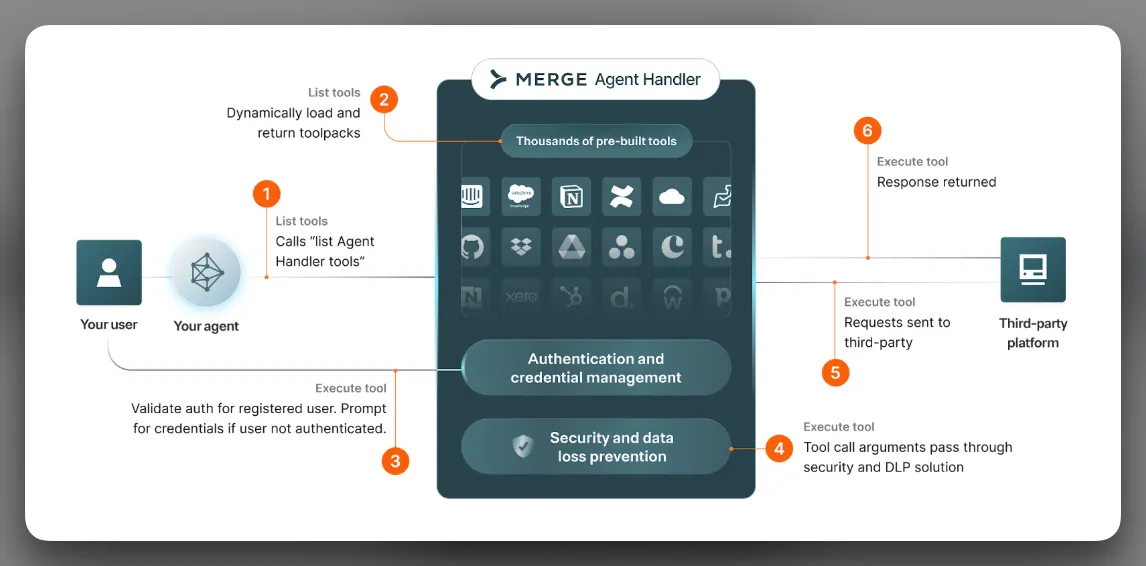
When your agent makes a tool call through Agent Handler, the call flows through these stages:
- Initialize the session. The agent connects to Agent Handler’s MCP endpoint with a bearer token. The token resolves to an organization, a Tool Pack, and a Registered User, and the agent issues a
tools/call. - Authenticate the Connector. The first time the Registered User calls a tool from a given Connector, they authenticate through Link. Agent Handler stores the credential against the Registered User; every subsequent call uses it transparently.
- Scan the request. The Security Gateway evaluates active rules against the tool arguments before they leave Agent Handler. Matched values are redacted, or the call is blocked from reaching the third party.
- Execute the tool call. The Connector calls the third party’s API with the (possibly redacted) arguments and the Registered User’s stored credentials. OAuth refresh happens here if the access token is near expiry.
Every step is captured in the Tool Call Logs. Every redaction is recorded. Every block surfaces as an alert.
Foundational features
The flow of every component within Agent Handler and how they tie together.
Registered User
A Registered User is the identity Agent Handler attaches every credential and tool call to. There is one Registered User per end user - a user of your product, an employee using their own AI assistants and tools, or your own dev account. You create them programmatically via the API; the IDs you pass (origin_user_id and optionally origin_company_id) are how you map back to your own database. Every credential, every Link session, every tool call, and every audit record is scoped to the Registered User. This is the unit of isolation. For lifecycle and multi-tenancy patterns, see Registered Users.
Connector
A Connector is a packaged integration with one third-party service. Agent Handler ships hundreds of them - Salesforce, Slack, Jira, GitHub, HubSpot, Linear, Asana, Workday, Stripe, and the rest. Each Connector defines its supported authentication options, the tools it exposes, and the input and output schemas for those tools. You don’t build Connectors; you enable them. The full catalog lives in the Connector marketplace.
Tool
A tool is one action a Connector exposes - slack__post_message, jira__create_issue, github__list_pull_requests. The naming is namespaced as <Connector>__<tool> on the wire so two Connectors with overlapping concepts don’t collide. Tools have a description (what the model sees) and a JSON schema for inputs (what the model has to produce). You can override both per Tool Pack.
Tool Pack
A Tool Pack is a named bundle of Connectors and the specific tools you want exposed to one agent surface. It’s the answer to “what is the agent allowed to do?” Most teams have more than one - a customer-support pack with read-only access, a revenue-ops pack with write access, and so on. Tool Packs are also where you apply Tool Description Overrides, Tool Input Overrides, and Security Gateway overrides. For when to create one pack versus many, see Tool Packs.
Link
Link is the embedded authentication UI. Your product opens Link, the end user picks a Connector, completes OAuth, lands back in your app. The result is a credential stored against their Registered User. Two ways to launch it: the React component (or hosted URL) for in-product flows, or Magic Link - a signed URL you generate server-side - for flows without a browser context. For the full flow, see Link.
Security Gateway
The Security Gateway is the layer that scans tool inputs and outputs against rules you configure. It runs on every tool call. Standard Entity Rules cover PII, PHI, payment data, and the other common categories with pre-trained detectors; Custom Regex Rules cover everything else with a shape you can write down; AI Guardrails cover the policies that are semantic rather than structural, written as plain-English instructions. Entity and regex rules take allow, redact, or block on tool arguments before they leave Agent Handler for the third party. Guardrails take block or log, and are the rule type that also screens what the third party sends back. Configured once at the organization level, overridable per Tool Pack. See Security Gateway.
Company
A Company is an optional grouping for Registered Users that share a tenant. You’d typically create one Company per customer in a B2B product, then attach the customer’s users to it - the way you express “these five users belong to Acme Corp” so you can query, scope, and report on them together. Pass origin_company_id when you create a Registered User to tie them to a Company.
Group
A Group is a dynamic slice of Registered Users defined by attributes you set. Where a Company is a fixed parent, a Group is a query - “users where role = 'admin'” or “users where region = 'EU'.” Groups also drive the IdP-to-role mapping for the Agent Handler for Employees setup - your IdP Groups sync into Agent Handler Groups, which grant access to Tool Packs.
Application Credential
An Application Credential is your own OAuth app’s client ID and secret, registered against a Connector. By default Agent Handler uses Merge’s OAuth apps; when you bring your own, the consent screen shows your branding, the rate limits scope to your account, and you control the OAuth scope set. You don’t need them to start. See Application Credentials.
Access Key
An Access Key authenticates your backend’s requests to the Agent Handler API and to the MCP server. Two kinds: production keys for your live backend and test keys for development, any number of each. Test keys are scoped to a sandbox, so credentials and tool calls created with a test key are isolated from production. Manage at Settings → API Keys; treat like any other secret.
A production key is organization-wide. From it you can mint user-scoped keys that name specific Registered Users and Tool Packs, which is what an agent session should carry. See Scoping access per user.
How they fit together
Your organization owns Tool Packs, Connectors, Registered Users, and Application Credentials. Each Registered User holds the credentials they’ve authorized for one or more Connectors and optionally belongs to a Company and any number of Groups. A Tool Pack decides which Connectors and which tools are exposed to one agent surface. The Security Gateway sits on the request path and applies rules to every tool call.
What the agent sees
A function call. Argument-in, result-out. The MCP client doesn’t know whether the response came from a clean call, a redacted call, or a retried call after a token refresh. That opacity is why you can swap in a new Tool Pack or rotate a customer’s credentials without the agent’s code changing - and why, on the integrator side, the full request, response, redactions, and latency breakdown are all in the Tool Call Logs.
Next
Make your first tool call against a real third-party API in the Quickstart.